
Operations intelligence for your entire team
Consolidate incidents, releases, deployments, and campaigns from all your tools. One daily brief. AI-powered. Zero noise.
Never miss what matters across your company.
✓ 14-day free trial • ✓ No credit card required • ✓ Setup in 5 minutes
Trusted by teams at forward-thinking companies
Your daily brief, reimagined
AI-powered digests delivered to your inbox or chat. Plus a searchable timeline of everything that matters.
Your Daily Brief
December 9, 2024December 2024
Select Channels
Choose Event Types
See incidents before they escalate
Visualize service dependencies, correlate releases with incidents, and detect patterns with our powerful analytics dashboard.
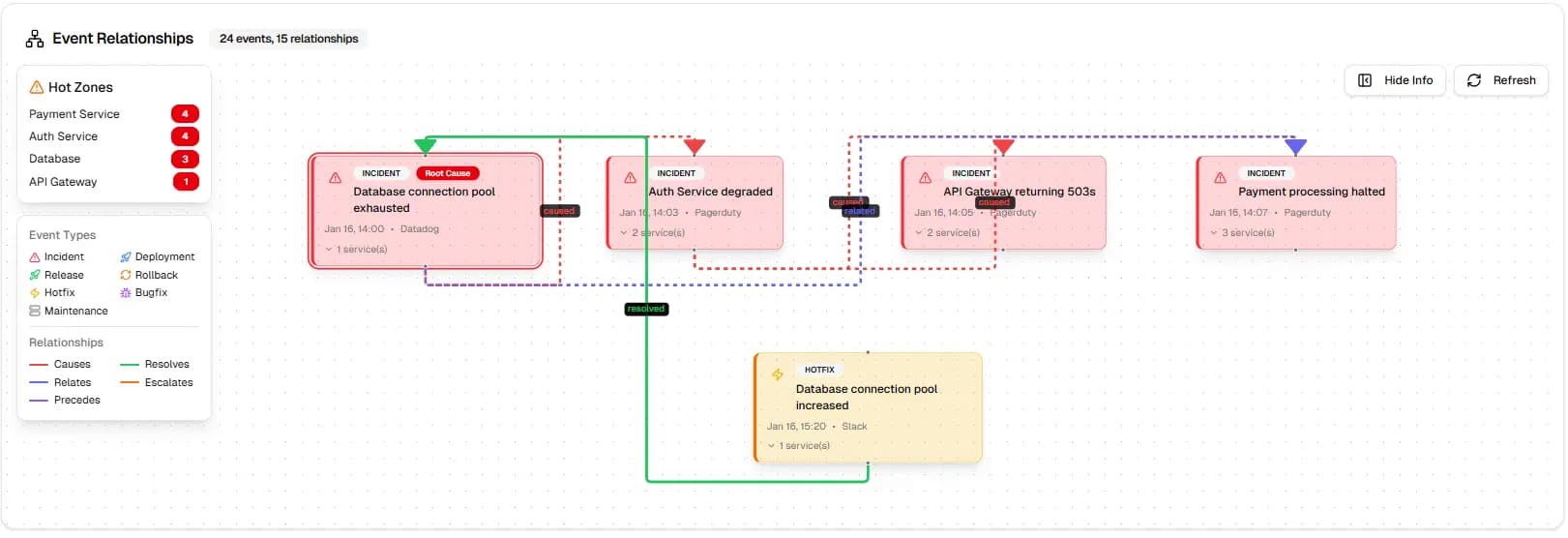
Find Root Causes in 30 Seconds
See CAUSES, RESOLVES, and RELATES relationships. Trace incidents back to their source.
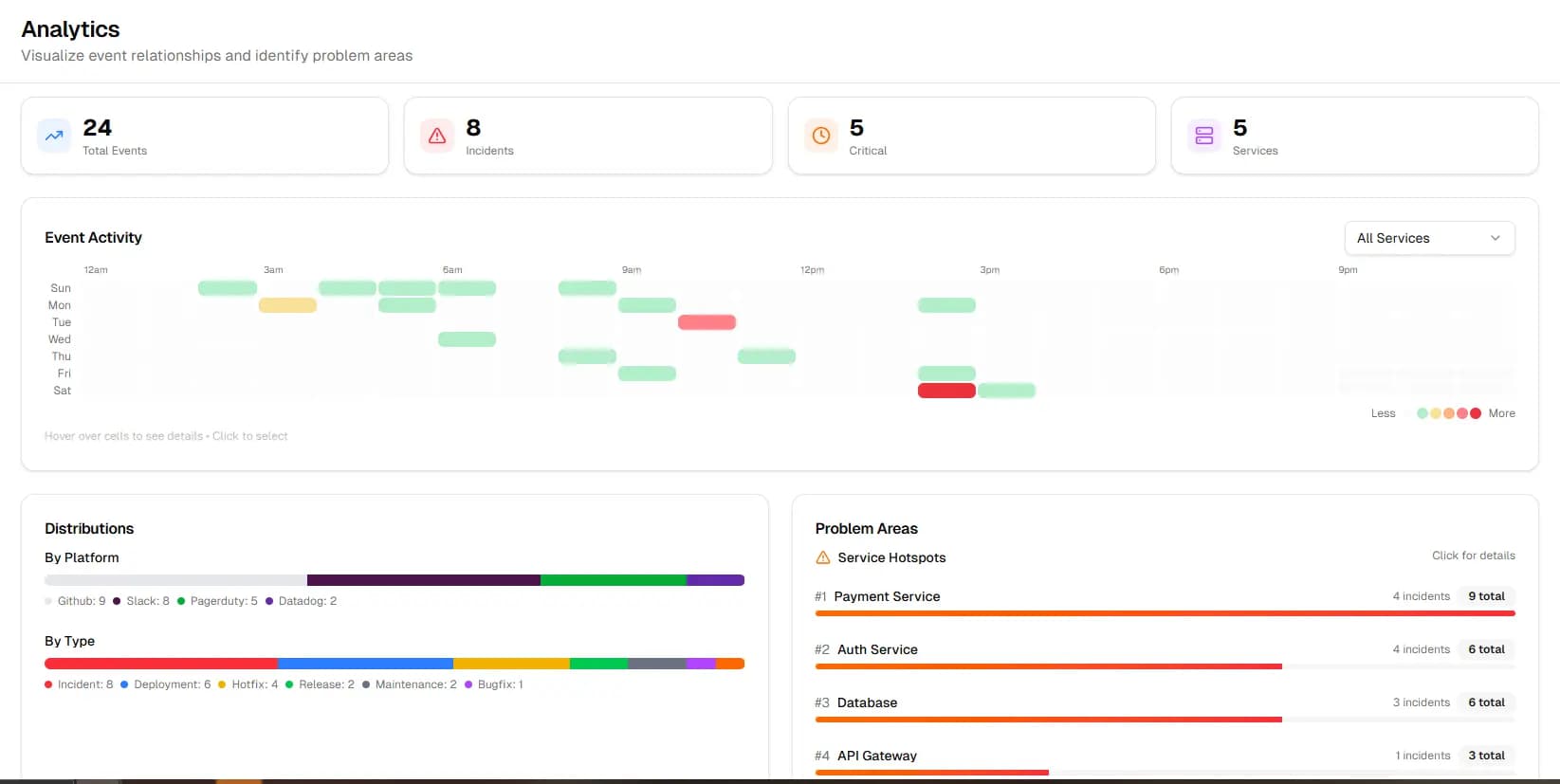
Spot Patterns at a Glance
7-30 day activity overview. Click any cell to drill into specific events.
Not just for Engineering. For everyone.
One platform for every team that needs to stay in the loop. Track what matters across departments - all in one place.
Engineering →
Track Releases, Incidents, Deployments, and Outages across GitHub, PagerDuty, and Slack
Product →
Monitor Feature Launches, Experiments, and User Feedback across Slack, Teams, and GitHub
Marketing →
Stay updated on Campaigns, Content, and Performance across HubSpot and analytics tools
Operations →
Get a company-wide view of what's happening across all departments and tools
Get started in 5 minutes
Three simple steps to transform how your company stays informed.
Connect Your Tools
Slack, Teams, GitHub, Discord, Datadog, and PagerDuty. One-click OAuth integration.
AI Extracts Events
Our AI automatically detects Releases, Incidents, Campaigns, Milestones, and more - classified by type and severity.
Get Your Personalized Brief
Daily email digest + searchable timeline. Each team member sees only what matters to them.
Integrates with tools you already use
Connect your entire stack. OpsBrief works across communication, development, and project management tools.
Slack
Monitor Slack channels and extract events automatically
- Monitor public & private channels
- AI-powered event extraction
- Real-time sync & notifications
Microsoft Teams
Monitor Teams channels, chats, and meeting summaries
- Monitor team channels & chats
- Meeting summaries & action items
- Unified dashboard with other platforms
Discord
Monitor Discord servers and community discussions
- Monitor server channels
- Community event tracking
- Thread & forum monitoring
GitHub
Monitor GitHub repositories for issues, PRs, releases, and deployments
- Track issues & pull requests
- Release & deployment notifications
- AI-powered event categorization
PagerDuty
Monitor incidents, on-call schedules, and service health
- Incident tracking & alerts
- On-call schedule monitoring
- Service health status
Datadog
Monitor alerts, metrics, and infrastructure health
- Monitor alerts & warnings
- Infrastructure health tracking
- Metric anomaly detection
Sentry
Monitor errors, issues, and application health
- Fatal & error level issues only
- Smart noise reduction
- Threshold-based alerting
Everything you need to stay informed
Stop drowning in messages. See what matters, skip the noise.
AI Event Extraction
Automatically detect Releases, Incidents, Deployments, Campaigns, and Milestones from your team conversations.
Smart Filtering
Each team member sees only what matters to them. Engineering sees Releases, Marketing sees Campaigns.
Searchable History
Never lose track of what happened. Search across all events, all channels, all tools with powerful filters.
Event Timeline & Calendar
See all events organized in a visual timeline and calendar. Never miss a Deployment or Milestone again.
AI-Powered Digests
Receive daily or weekly AI-generated summaries directly in your inbox, grouped by event type.
Real-Time Alerts
Get instant notifications for critical events like Outages, Security Incidents, or major Releases.
Multi-Department Support
Not just Engineering. Track events across Product, Marketing, Sales, and Operations - all departments.
Analytics & Insights
Understand patterns in your team's activity. Track release velocity, incident frequency, and more.
Enterprise Security
SSO/SAML support, data encryption at rest and in transit. Your data stays yours.
Why companies choose OpsBrief
See how OpsBrief compares to alternatives.
vs. Slack Email Digests
Just raw messages, no intelligence
OpsBrief extracts actual events with AI-powered classification
vs. Other Digest Tools
Only works in Slack
OpsBrief works across Slack, Teams, GitHub, Discord, Datadog, and PagerDuty
vs. Building In-House
Months of dev time, ongoing maintenance
OpsBrief works in 5 minutes with one-click integrations
See it in action
How different roles use OpsBrief to stay informed.
Engineering Manager
“On Monday morning, I see every Release, Incident, and Deployment from the past week. No more digging through 1,000 Slack messages.”
Product Manager
“I instantly know what shipped, what experiments launched, and what feedback came in across engineering and product channels.”
VP of Operations
“One daily brief shows me what happened across Engineering, Product, Marketing, and Sales. I'm never out of the loop.”
Loved by teams everywhere
Join hundreds of teams using OpsBrief to stay on top of what matters.
“OpsBrief has become essential for our daily standups. We know exactly what shipped and what incidents occurred overnight. Reduced our meeting time by 50%.”
Fred Walters
VP Engineering, TechCorp
“As a PM, I used to spend 2 hours every morning catching up on Slack. Now OpsBrief gives me everything in a 5-minute digest. Absolute game changer.”
Mike Rodriguez
Product Manager, Aleric Technologies
“Finally, I can see what's happening across Engineering, Product, AND Marketing without joining 50 channels. The multi-department view is invaluable.”
Emily Watson
COO, Immersion Optics
Frequently Asked Questions
Everything you need to know about OpsBrief.
How long does setup take?
About 5 minutes per integration. Connect Slack, Teams, Discord, GitHub, PagerDuty, or Datadog with OAuth - select the channels or repos you want to monitor, and you're done. No complex configuration required.
What platforms do you support?
We fetch events from Slack, Microsoft Teams, Discord, GitHub, PagerDuty, and Datadog. We are constantly adding new platforms to our support list. Connect multiple platforms to get a unified view of all your operational events in one dashboard.
Do I need technical knowledge?
No. Each integration uses simple OAuth connections. Just click 'Connect' and authorize. No code, no API keys, no developer required.
Can I customize which events I get in my digest?
Yes. Each user can filter by event type (Releases, Incidents, Deployments, etc.), severity level, platform, and specific channels or repositories. Your team members see only what's relevant to them.
Where do I receive my digest?
You can receive your digest via email, Slack channel or SMS number you provided during setup. You can also configure your preferred frequency and delivery time.
What if my tool isn't supported yet?
Request it! We add new integrations based on customer demand. Enterprise customers can also request custom integrations for their specific tools.
Is my data secure?
Absolutely! We never store raw message content, only extracted events. All data is encrypted at rest and in transit, and we follow industry-standard security practices. See our security documentation for details.
Can I cancel anytime?
Yes, absolutely! No long-term contracts required. Cancel with one click from your dashboard. Your data will be deleted within 30 days of cancellation.
How accurate is the AI event extraction?
Our AI achieves 97%+ accuracy for standard event types. You can customize event detection with keywords and provide feedback to improve accuracy for your specific use cases.
Do you offer a free trial?
Yes! 14-day free trial with full access to all features and integrations. No credit card required to start.